.png?height=40&name=icon%20(2).png)
Before being able to view a Learner's or cohort's performance, you must select the subscription the Learners are a part of. Click on the blue dropdown box and choose the subscription you are wanting to view.
The Course Progress menu shows the competency levels of each Learner of a given PeriopSim Experience module, ranging from Incomplete to an "A".
You will also see that the boxes are color-coded to align with the lower menu, Simulated Clinical experiences. These color-code number values represent on average, the number of times it will take a Learner to achieve that competency level.
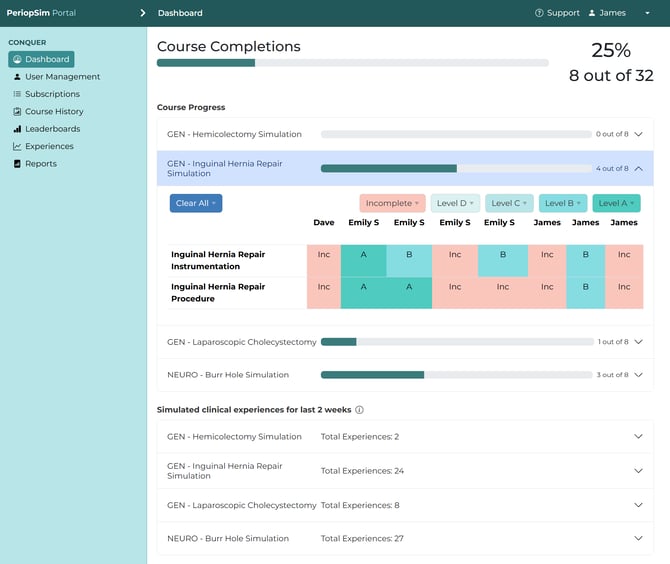
The expanded lower menu, "Simulated clinical experiences for last 2 weeks" shows the amount of times a Learner has completed a PeriopSim Experience module. You will see that the boxes are color-coded to align with the Course Progress menu above. These color-code number values represent on average, the number of times it will take a Learner to achieve that competency level. 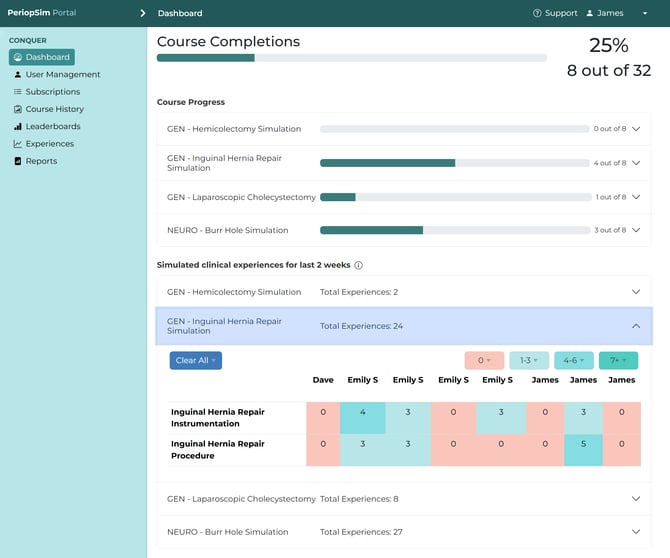
For more information on the competency levels, navigate to our Knowledge Base article Dashboard Competency Levels and Assessments