.png?height=40&name=icon%20(2).png)
The easiest and most direct path to log into a PeriopSim Learning App with an enterprise enabled email address:
1. Once the app has been downloaded, select "Login" and you will be shown a page "Choose how to login"
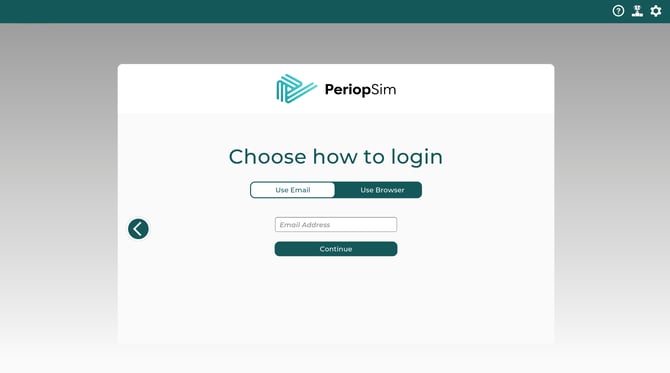
2. Select "Use Browser"
3. Click the URL included in the app screen and enter your organization email address
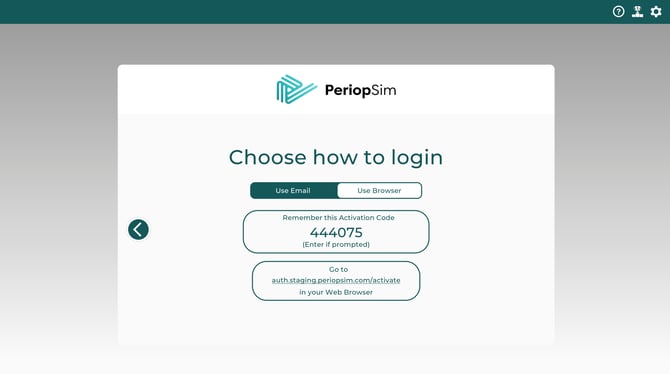
4. If your browser is logged into your organization's corporate identity provider, you will automatically be logged in and will see "Activation Successful"
5. If you are not logged into your organization's corporate identity provider, you will be redirected to your corporate Identity Provider (e.g., Okta, Microsoft Entra ID, or Google Workspace)
6. Enter your organization credentials (email address and password) to approve the login
7. You will now see "Activation Successful" and be logged into the PeriopSim Learning App
Please note:
-
Use your official organization email address.
-
If you're already logged into your browser, you may be signed in automatically
-
If prompted to choose an account, select your organization's account and not a personal account
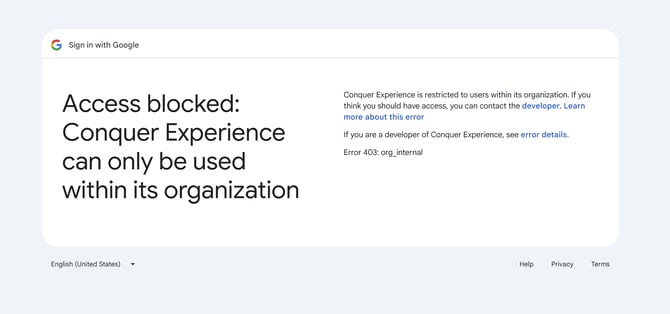
Please Note: If the following message appears, you are likely not logged into your enterprise account. Please log out and log in again using your organization's corporate identity provider (e.g., Okta, Microsoft Entra ID, or Google Workspace).