.png?height=40&name=icon%20(2).png)
A learner can not be added to a course until they are first put into the account under User Management. Go to the section labeled "Learner Groups" in User Management and verify your learners have been entered into the account.
You will notice a warning symbol next to each student's name that identifies students which have not yet been added to an active subscription. This warning symbol will state "Student is not allocated to an active subscription. Click to add to subscription."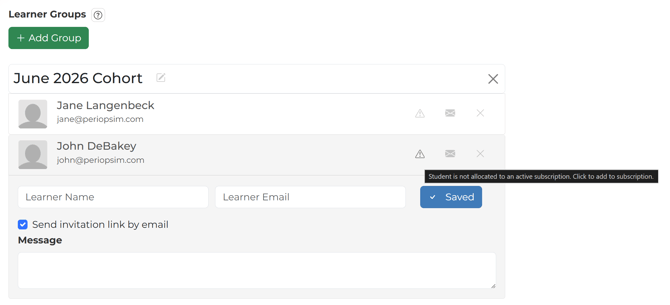
At this point, learners that have been added to the account should only be able to see demo content within the PeriopSim Learning Apps, but not yet able to see the course content which resides in the purchased course(s).
To add learners to a Course Subscription, navigate to the left hand side of the page and click on the "Subscriptions" tab. Once on the Subscriptions page you will see the various subscriptions which have been purchased for your account.
To batch add learners to a Course Subscription, simply click on "Add Group" then select from the menu the group you would like to add. If adding an individual Learner, simply click on "Add Student" and select the student's name from the menu.
Please Note: If Learners have been added to a Course Subscription with a future start date, you will continue to see the warning symbol next to each Learner's name until the Course Subscription becomes active
Now that your Learners have been added to a Course Subscription, when going back to User Management you will notice the warning symbol is now removed from each Learners name. This is your verification that these students now live in a purchased Course Subscription.
Once a Learner has successfully completed a playthrough, their license will be locked, preventing them from being removed from a course. However, if your Learner has not yet completed an experience, they can still be deleted from a Course Subscription. Please note: If you have a Learner with a locked license who needs to be removed from a subscription, kindly reach out to your Customer Success Manager for further assistance.